Verifiable medical notes for South African clinics
Sick notes that prove themselves.
Licit Note connects your reception desk to your doctors and gives every note its own QR code and link. Employers, schools, and universities check a note in their browser, without phoning the clinic.
- Secure QR verification Every note gets its own random link, created on our servers.
- Doctors checked against the HPCSA No doctor issues a note until their registration is verified.
- Privacy conscious checks A check never shows ID numbers, phone numbers, or the reason for the visit.
Who it’s for
Built for the clinic, and for everyone who receives its notes.
Clinics use Licit Note every day. Everyone else only needs a phone camera.
-
Private practices and clinics
Reception checks patients in, doctors issue notes from their phones, and the clinic admin decides who joins. One connected system for the whole practice.
-
Employers and HR teams
Check that a note you’ve received is genuine and still stands, straight from its QR code. No account, no app, no phone call.
-
Schools and universities
Confirm the status of a student’s note without asking for more of their medical information.
How it works
See Licit Note in action.
Reception , then Doctor , then Verification
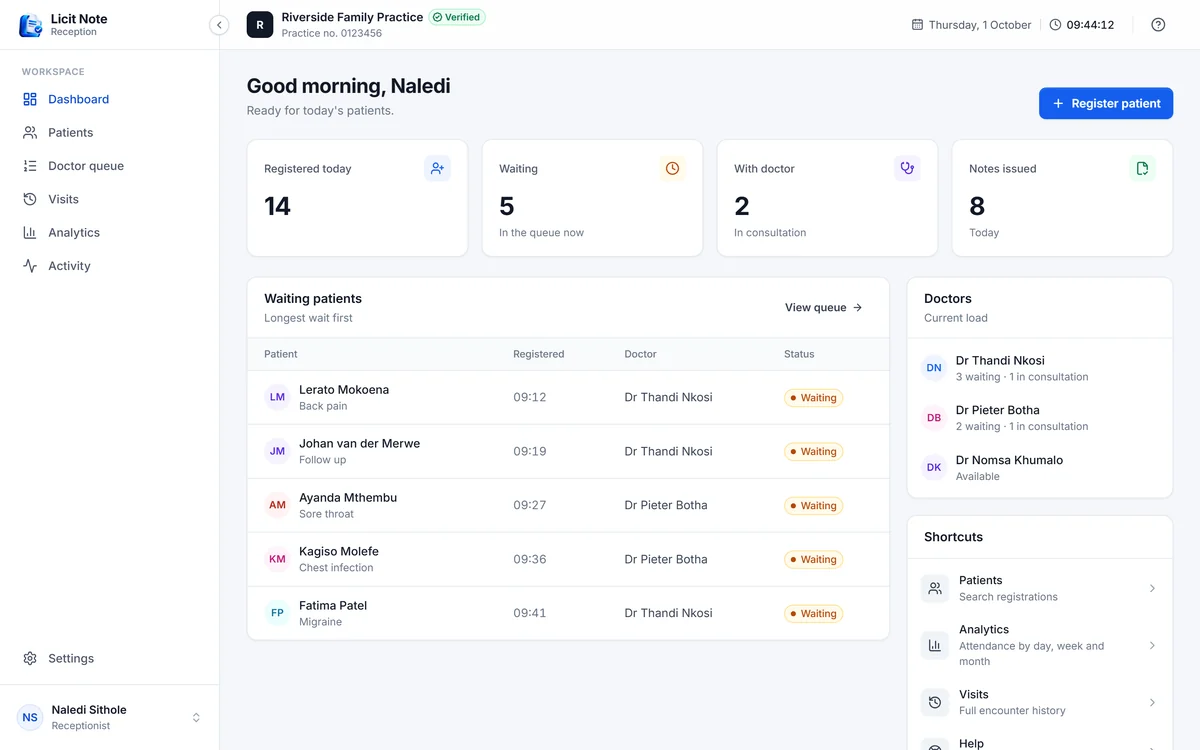
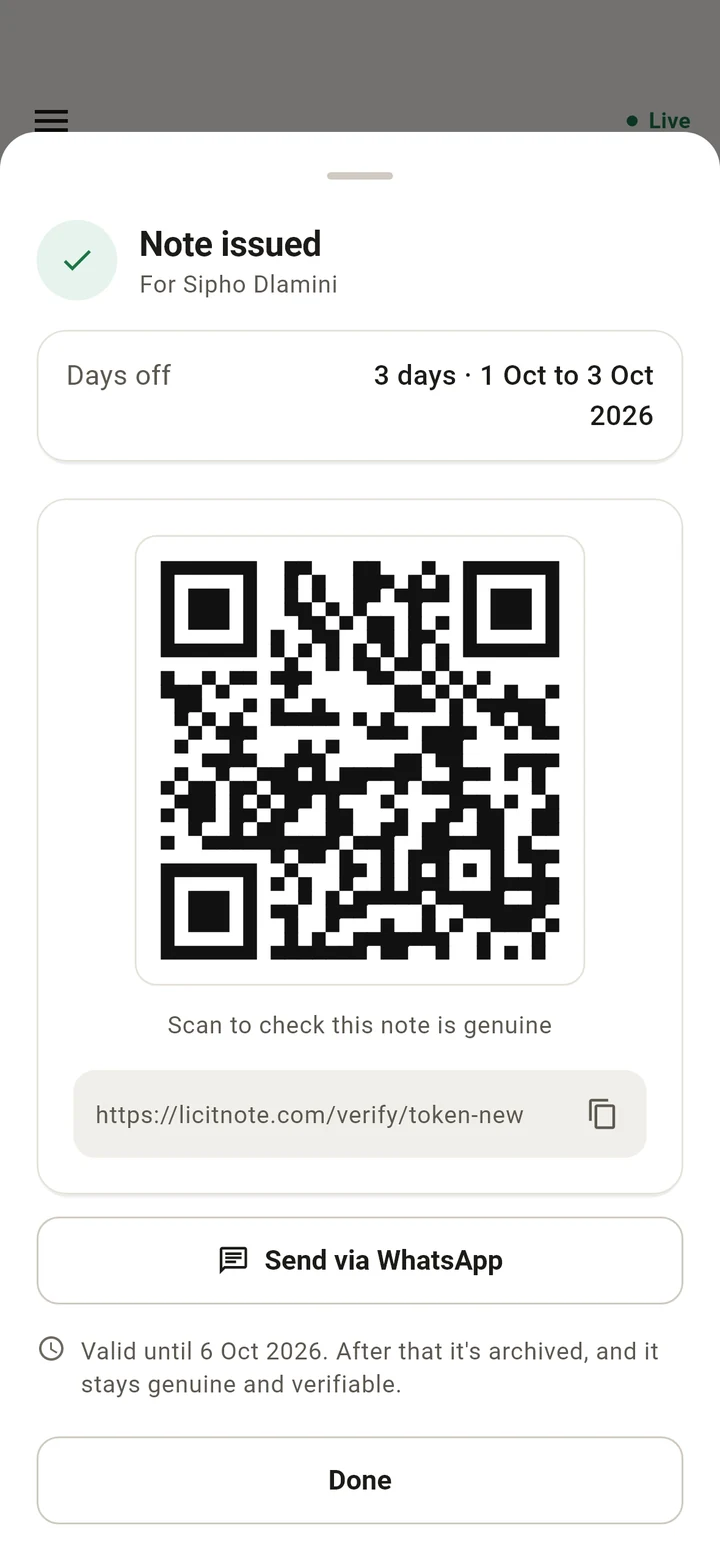
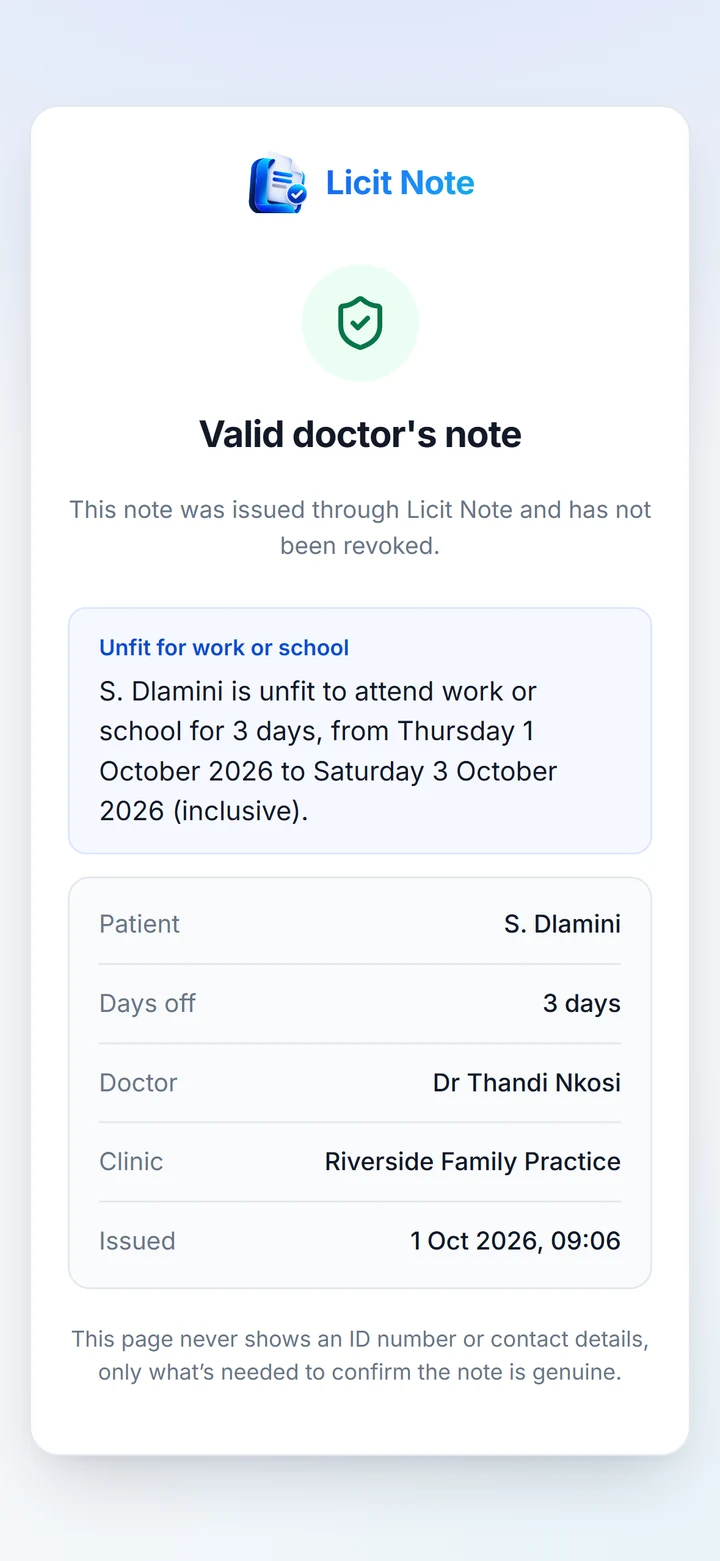
One note and one connected workflow, from the front desk to the person who checks the note. These are the real apps, with made up patients.
Why Licit Note
Replace slow manual checks with a connected digital process.
A paper note can’t tell anyone whether it’s genuine. Licit Note puts that answer one scan away, and keeps the clinic’s side of the process in one place.
| Paper notes and phone calls |  With Licit Note |
|
|---|---|---|
| The note | Paper can be lost, copied, or altered, and a copy looks like the original. | Every note is created on Licit Note’s servers, with its own QR code and link. |
| Checking it | Someone phones the clinic, often in its busiest hours, and waits for reception to look it up. | The recipient scans the QR code and sees the result in seconds, at any hour. |
| Corrections | A note issued in error stays in circulation. | The doctor revokes it, and every check after that shows it’s no longer valid. |
| Records | Lists and files are kept by hand and searched when someone asks. | Check in, the queue, and every note stay connected, from the front desk to the doctor. |
Try it
See verification in action.
Scan the sample note with your phone camera, or open the sample result. It shows what a recipient sees when they check a note.
This is a sample with made up details. It isn’t a doctor’s note, and the real check service isn’t involved. In this sample, dates appear as Day 1 to Day 3. A real check shows the actual dates.
Demo Patient

licitnote.co.za/sample-note
Valid for 5 days, or until the days off end if that’s later. After that it’s archived, and it stays genuine and verifiable.
Sample What the recipient sees
Valid doctor’s note
This note was issued through Licit Note and has not been revoked.
Unfit for work or school
D. Patient is unfit to attend work or school for 3 days, from Day 1 to Day 3 (inclusive).
- Patient
- D. Patient
- Days off
- 3 days
- Doctor
- Dr Sample Provider
- Clinic
- Licit Note Demo Clinic
- Issued
- Day 1, 09:41
This page never shows an ID number or contact details, only what’s needed to confirm the note is genuine.
For reception
A cleaner workflow for reception.
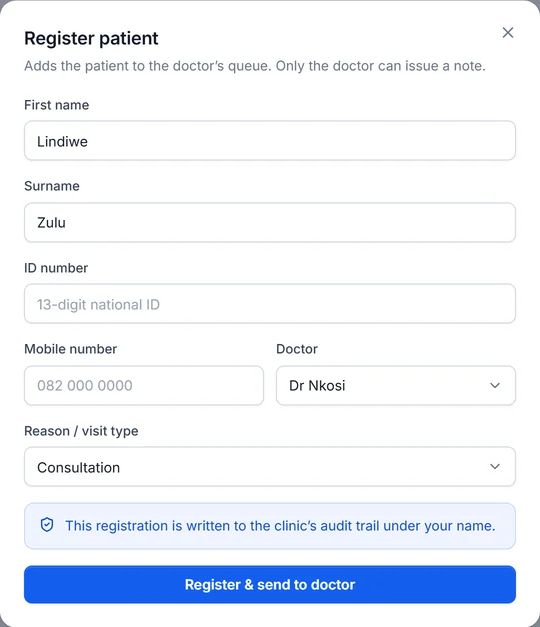
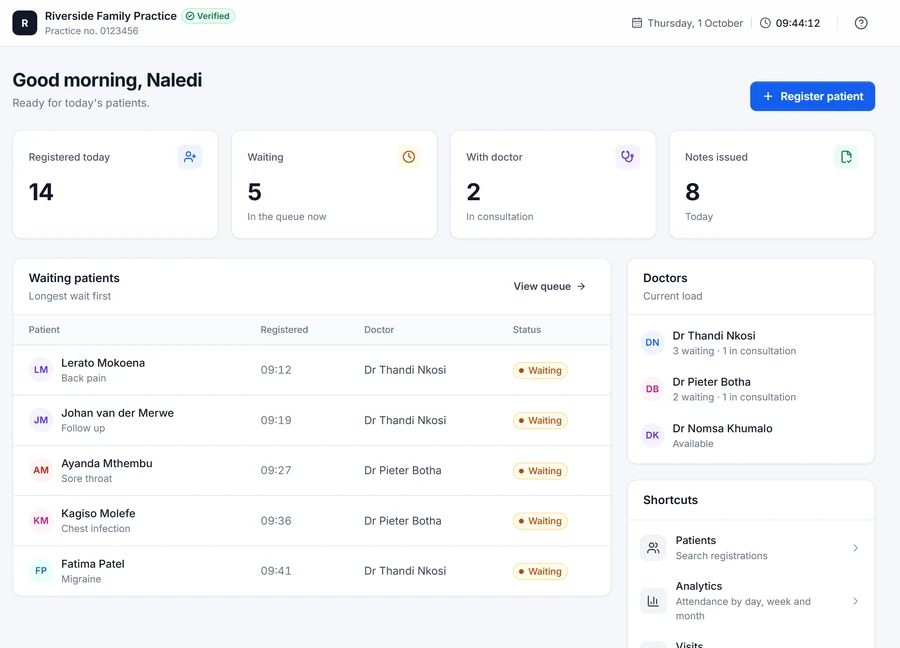
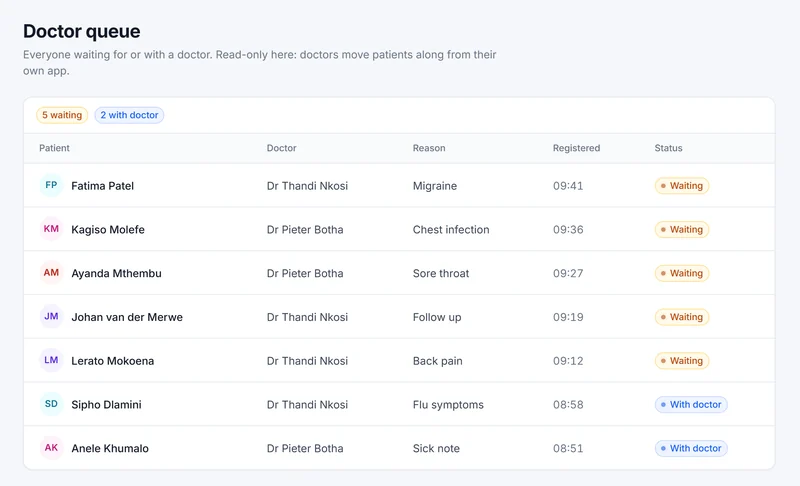
The front desk registers each patient once and sends them to the right doctor. Everyone can see where the morning stands, without paper lists or calls down the corridor.
- Check patients in with their ID number, mobile number, doctor, and visit type. Returning patients are found by their ID, so nobody is registered twice.
- Send them to the doctor. The patient lands in the chosen doctor’s queue immediately.
- Follow the queue as doctors start consultations, and see each visit’s status.
- See the day at a glance: registrations, the waiting list, and notes issued, with attendance by day, week, and month.
- Find a patient by name and see their visit history.
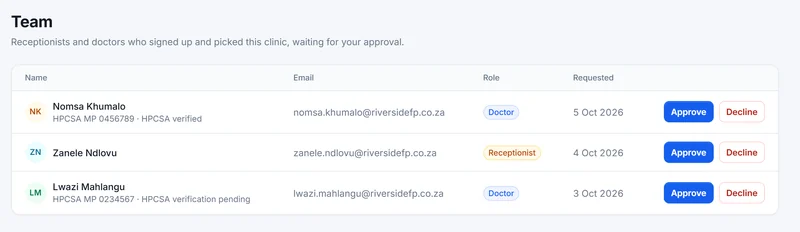
- Approve your team. Clinic admins approve every receptionist and doctor before they see a patient.
For doctors
The doctor workflow, without the paperwork chase.
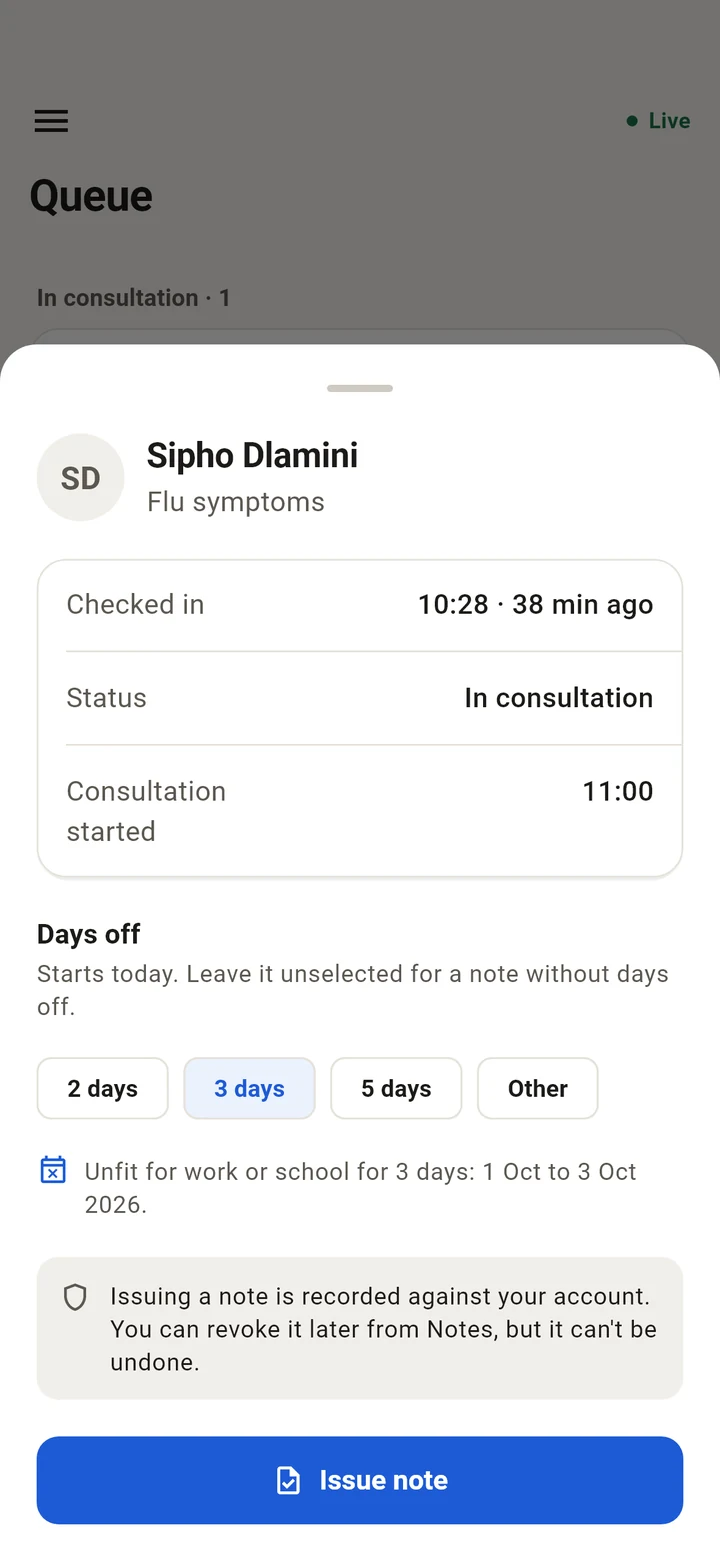
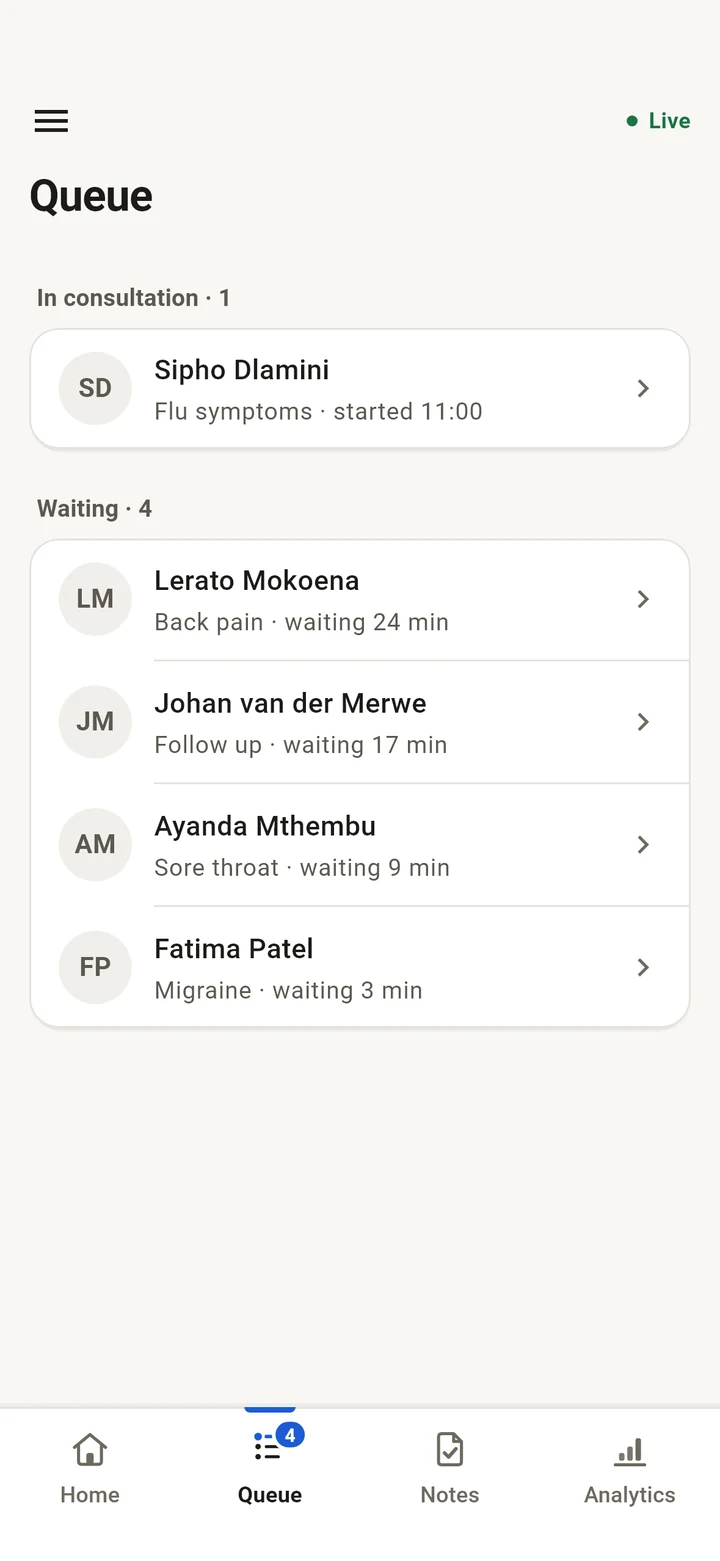
The Licit Note app for Android puts the queue in the doctor’s pocket. See who is waiting, start the consultation, and issue a note anyone can verify.
- Your queue, live
- See who is waiting and why they came, with an alert when reception checks someone in for you.
- Issue in seconds
- Choose 2, 3, or 5 days off, or any number up to 30. The note states the exact dates.
- Share it your way
- Show the QR code, or send the link to the patient on WhatsApp.
- Reissue when needed
- A new QR code and link replace the old ones, which stop working at once.
- Revoke when it’s wrong
- Revoking is permanent. Every check after that shows the note is no longer valid.
- Your notes and your day
- Search and filter your notes, and see today’s numbers at a glance.
Doctors register in five short steps. Licit Note checks their HPCSA registration, and their clinic approves them, before they see patients or issue notes.
For employers, schools, and universities
Verify without calling the clinic.
Every Licit Note has a QR code and a link. Checking one takes a few seconds and needs no account or app.
Scan the QR code, or open the link
Any phone camera works. Every genuine note links to Licit Note’s official verification service.
Read the result
The result opens in the browser on app.licitnote.com, Licit Note’s verification service.
Act on it
If a note is revoked or not found, ask for a new copy, or contact the clinic that issued it.
- Valid doctor’s note. Issued through Licit Note and not revoked.
- Valid, older note. Genuine, but past its validity period.
- Revoked. The doctor withdrew it. Treat it as invalid.
- Not found. No note matches the link.
Whether to accept a note is still your organisation’s decision. Licit Note tells you whether it’s genuine.
Security
Verification designed around trust.
What a clinic owner needs to know about how Licit Note protects its notes and its patients, in plain terms.
Notes are created securely
Every note is created by the Licit Note system, after it checks the doctor and the consultation. It isn’t a document anyone can edit afterwards.
Verification links are hard to guess
Each note’s link carries a long, random code that belongs to that note alone, so working links can’t realistically be guessed.
The public view is limited
A check shows only what’s needed to confirm the note. ID numbers, phone numbers, and the reason for the visit stay private.
Important actions are recorded
Issuing, reissuing, and revoking notes, registering patients, and signing in to the reception app are recorded with who did it and when.
Privacy
What stays private.
A note check shows only what someone needs to confirm the note is genuine. Everything else stays in the clinic’s records.
Your clinic stays in control. It decides who joins, and only its approved staff and verified doctors can see its patients. How that works
What a note check shows
Shown to the person checking
- Result
- Valid, valid older note, revoked, or not found
- Patient
- Initials and surname
- Days off
- How many, with the dates (if given)
- Doctor
- The doctor’s name
- Clinic
- The clinic’s name
- Issued
- Date and time
Stays private
- ID number
- Never shown
- Phone number
- Never shown
- Reason for the visit
- Never shown
- The clinic’s other records
- Never shown
Getting started
From registration to your first verified note.
-
01
Register your clinic
At app.licitnote.com, give your clinic’s name, practice number, and addresses. You become its first clinic admin.
-
02
We review it
The Licit Note team checks every new clinic’s details before it can be used. You can sign in once it’s approved.
-
03
Your team joins
Reception staff create accounts and choose your clinic. Doctors register in the Android app with their HPCSA number. You approve each person, and we verify every doctor.
Pricing
Clinic pricing
Designed around your practice.
Licit Note pricing is based on the size and workflow of your clinic. Tell us about your practice, and we’ll reply with pricing for it.
Tell us
- Where your clinic is
- How many doctors will use Licit Note
- How many reception staff will use it
- How many clinic locations you have
Opens an email to support@licitnote.com with these questions ready to answer.
What is Licit Note?
Licit Note is software for South African clinics. Reception registers each patient and sends them to a doctor, the doctor issues the note from an Android app, and every note gets its own QR code and link that anyone can use to check it’s genuine. Licit Note is made by Permason Technologies.
Who can use Licit Note?
Clinics registered on Licit Note, with three kinds of account:
- Clinic admins register the clinic and approve their team.
- Reception staff use the reception app in a web browser at app.licitnote.com.
- Doctors use the Android app, once their HPCSA registration is verified and their clinic approves them.
Anyone who receives a note, such as an employer, school, or university, can check it without an account.
How does note verification work?
When a doctor issues a note, our server creates it with a long random code. The note’s QR code and link carry that code. Opening the link asks Licit Note’s verification service for the note that matches it, and the page shows the result: valid, a valid older note, revoked, or not found.
What information is shown when a note is verified?
Only what’s needed to confirm the note: the patient’s initials and surname, any days off with their exact dates, the doctor, the clinic, and when it was issued. For example:
Valid doctor’s note. D. Patient is unfit to attend work or school for 3 days, from Day 1 to Day 3 (inclusive). Dr Sample Provider, Licit Note Demo Clinic. Issued Day 1, 09:41.
(This example uses Day 1 to Day 3 in place of dates. A real check shows the actual dates.)
A check never shows the patient’s ID number, phone number, or the reason for the visit.
Can a revoked or expired note still be checked?
Yes. A check always gives an answer:
- Revoked: the doctor withdrew the note, so treat it as invalid. Revoking is permanent.
- Valid, older note: the note is past its validity period (5 days, or the end of its days off if that’s later). It was genuinely issued and wasn’t revoked, so it stays verifiable.
- Reissued: if a doctor reissues a note, its old QR code and link stop working and show as not found. The new ones work.
Does Licit Note store patient information?
Yes. To run the queue and issue notes, it stores what reception enters: the patient’s name, South African ID number, mobile number, the reason for the visit, and their doctor. Only approved staff and verified doctors at that clinic can see it, and the database itself enforces that.
Issued notes, and the record of who issued, reissued, or revoked them, are kept so notes stay verifiable. The clinic is responsible for its patients’ information, and we process it on the clinic’s behalf. The reception app Privacy Policy has the detail.
How does a clinic register?
Register at app.licitnote.com with your clinic’s name, practice number, and addresses. You become its first clinic admin. We review every new clinic before it can be used, then your reception staff and doctors join and you approve each of them.
Which devices does Licit Note work on?
The reception app runs in a web browser, on the computer at your front desk. The doctor app is for Android phones. Checking a note works in any modern browser, on any phone or computer.
How do I contact support?
Email support@licitnote.com. If you use one of the apps, you can also go to Settings, then Contact support. The support page explains what to include.
Bring your clinic’s note workflow into one verified system.
Connect reception, doctors, and note verification in one workflow built for South African clinics.