
How to verify a doctor’s note
A doctor’s note from Licit Note has a QR code and a link. Checking it takes a few seconds, needs no account or app, and shows the note exactly as the doctor issued it.
Three steps
Find the QR code or link
It’s on the note, or in the WhatsApp message the patient got from the doctor. Links start with licitnote.com/verify.
Scan it, or open the link
Point your phone camera at the QR code and tap the link that appears. The check opens on app.licitnote.com.
Read the result
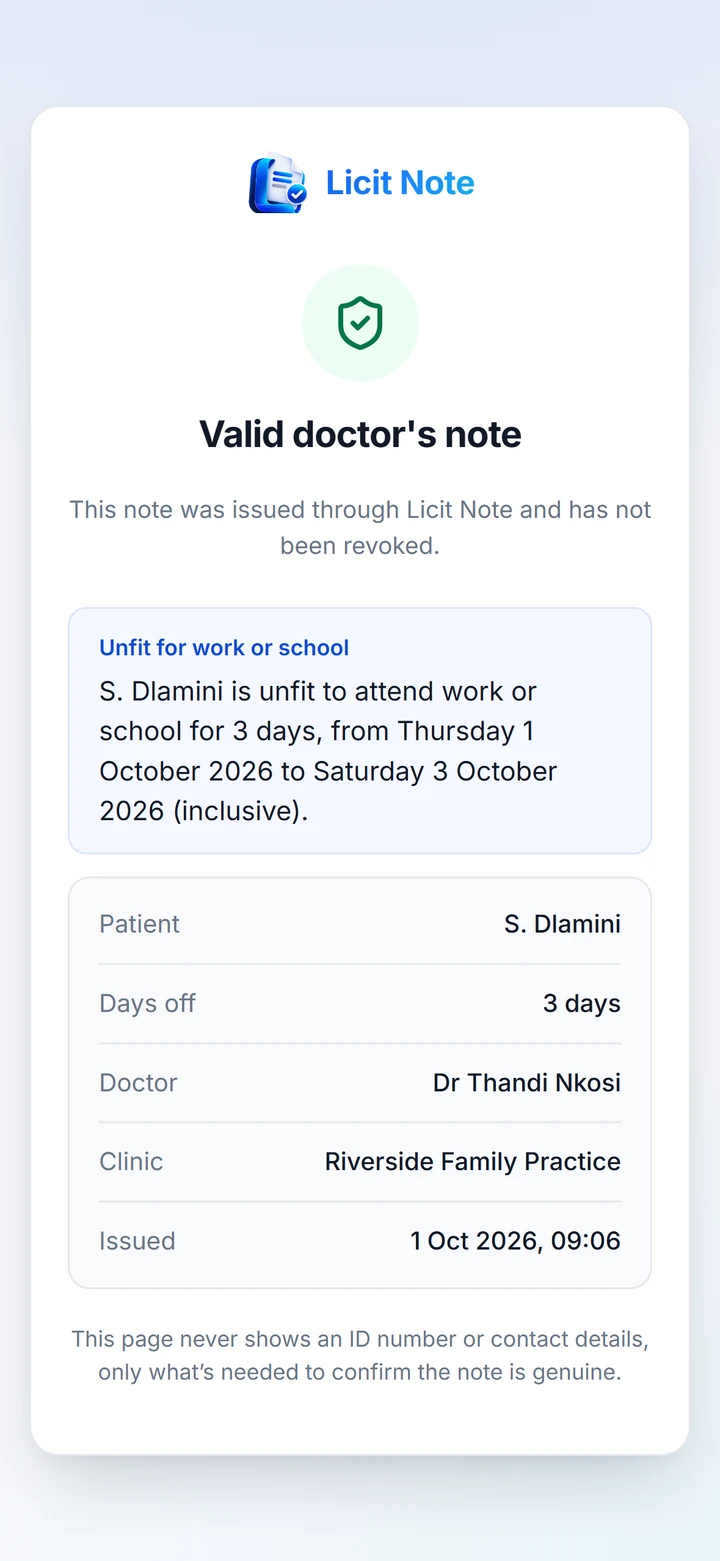
The page says whether the note is genuine and shows the patient, the doctor, the clinic, when it was issued, and any days off.
What the result means
Valid doctor’s note
Issued through Licit Note and not revoked. You can rely on what it shows.
Valid, older note
Genuine and not revoked, but past its validity period: 5 days, or the end of its days off if that’s later.
Revoked
The doctor withdrew this note. Treat it as invalid.
Not found
No note matches the link. It may have been copied wrongly, so ask for it again. A code that never matches is not a Licit Note.
What you’ll see, and what you won’t
Shown
The patient’s initials and surname, the days off with exact dates, the doctor, the clinic, and when the note was issued.
Never shown
The patient’s ID number, phone number, or the reason for the visit. Diagnoses stay at the clinic.
Check the address. A genuine check only ever opens on app.licitnote.com. If a QR code or link takes you anywhere else, the note didn’t come from Licit Note.
Want your clinic’s notes to be checkable?
Register your clinic, and every note your doctors issue gets its own QR code.